
Use Case Guide
Best Profile Picture Ideas: Turn Yourself into a Minifigure for LinkedIn, Discord, Twitter
March 2026 · 6 min read
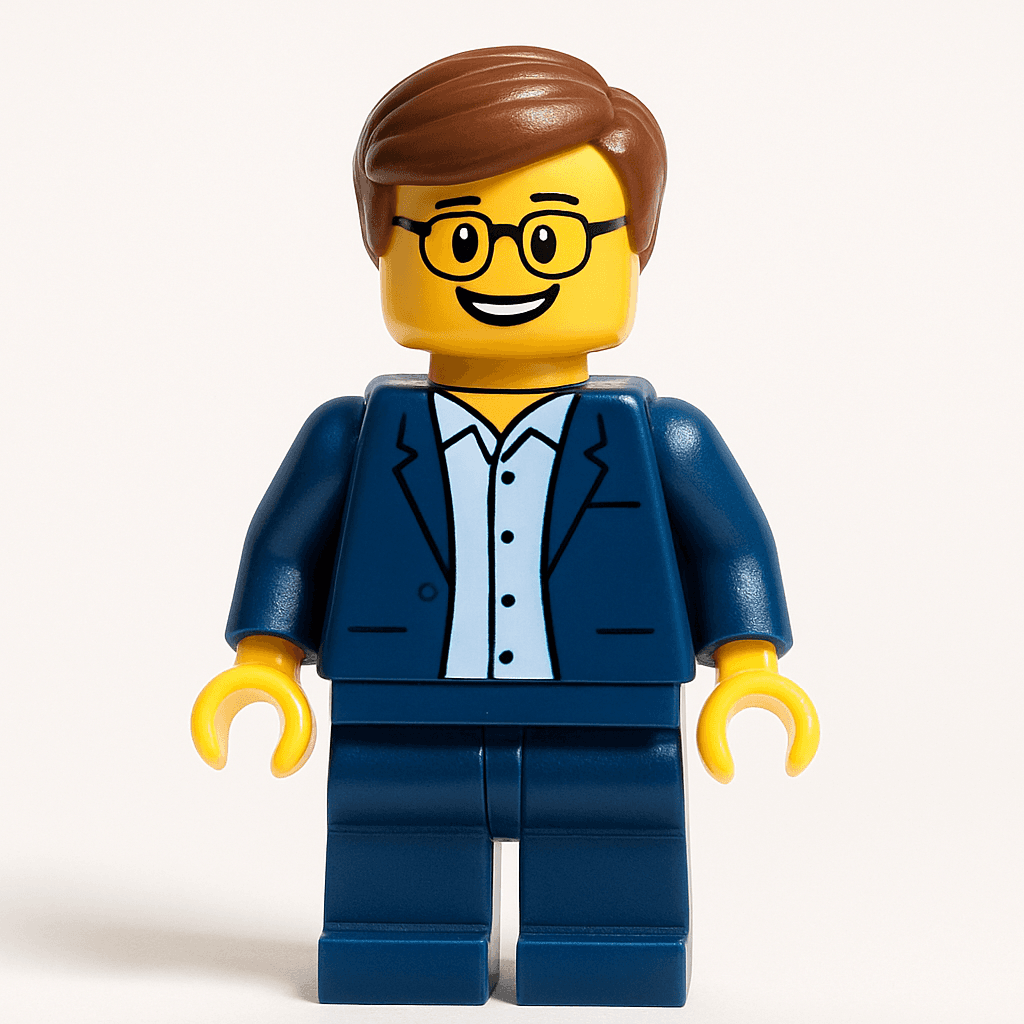
Your profile picture is your first impression across every platform — LinkedIn, Discord, Twitter, Instagram, Slack. Before anyone reads your bio, checks your work history, or sends you a message, they see your avatar. A forgettable headshot blends into the background. A Minifigure avatar stops the scroll.
Minifigure avatars are instantly recognizable, universally charming, and — critically — impossible to confuse with anyone else in a feed full of generic professional headshots. They signal personality, creativity, and the confidence to be different. And unlike a photo that ages or depends on good lighting, a Minifigure avatar is timeless.
This guide covers why AI avatars work as profile pictures, how to create the best one for each platform, and which style to choose so your avatar matches the culture of the community you are in.
Step-by-Step Guide
- 1
Go to MiniFigureAI and upload your photo
Visit minifigureai.com and upload any portrait or selfie. Your first avatar is completely free — no credit card, no account required. The tool works on any device including your phone. - 2
Choose your style based on the platform
Select Minifigure for LinkedIn and Slack, Chibi or Anime for Discord, Pop Art for Twitter, or Ghibli for Instagram. You can generate multiple styles from the same photo to cover all your platforms in one session. - 3
Let the AI generate your avatar
Generation takes about 60 seconds. The AI preserves your likeness — hair color, facial features, even your clothing style — while transforming the overall aesthetic into the character style you chose. - 4
Download in high resolution
Download your avatar as a PNG. The file is large enough for any platform — profile pages, Slack, Twitter, LinkedIn, and print uses like business cards or name badges. - 5
Update your profiles and wait for the comments
Set it everywhere at once. The consistency of using the same (or style-matched) avatar across platforms makes you more recognizable as a person, not just as a username.
Tips for the Best Results
- Use front-facing photos for the best likeness. The AI reads facial features most accurately from a straight-on angle with good lighting. Avoid sharp angles, heavy shadows, or photos where sunglasses or hats obscure your face.
- Dress the part for LinkedIn. Professional attire — a blazer, collared shirt, or suit jacket — translates directly into the Minifigure design. If you want a professional Minifigure avatar, wear professional clothing in the source photo.
- Casual selfies work great for Discord and Twitter. A relaxed, natural expression in everyday clothing produces a more personable avatar for social and community platforms. You do not need a studio shot — a good phone selfie in natural light is ideal.
- Match your style to the platform culture. A Cyberpunk avatar might raise eyebrows on LinkedIn but earn you instant credibility in a developer Discord. Think about what the community values and choose accordingly.
- Try different styles for different platforms. You can generate several avatars from the same source photo in a single session. Having a Minifigure for LinkedIn, a Ghibli for Instagram, and a Pixel Art for Discord means each community sees the version of you that fits their context.
Minifigure style — professional, playful, built for LinkedIn and Slack
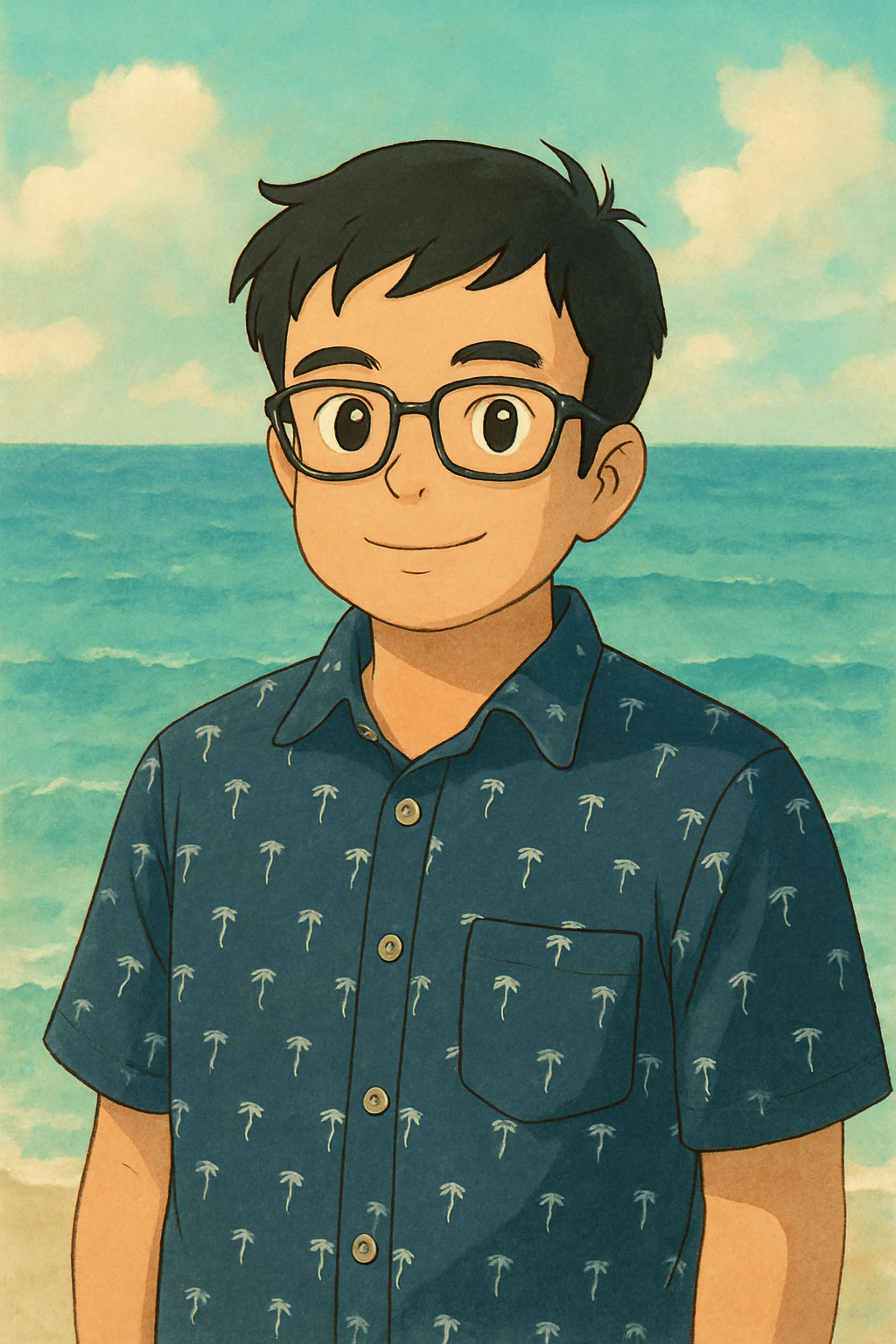
Ghibli style — warm, painterly, built for Instagram and creative communities
Best Avatar Styles by Platform
Different platforms have different cultures — and the avatar style that earns credibility on LinkedIn may feel out of place on Discord. Here is the breakdown by platform.
Best styles: Minifigure, Oil Painting, Renaissance
LinkedIn is where standing out matters most — and where most people play it the safest. The platform is saturated with identical headshots: slightly soft focus, neutral background, forced smile. A Minifigure avatar short-circuits the pattern completely. It reads as confident and creative — the kind of person who has good judgment about what is worth taking seriously and what is not.
If you want something more painterly and elevated, the Oil Painting style translates professional attire beautifully — a suit or blazer rendered in classical brushwork looks immediately distinctive without being unconventional. The Renaissance style carries similar energy: timeless, authoritative, and impossible to ignore.
Pro tip: Professional attire from your original photo transfers directly into the Minifigure design — your blazer, collared shirt, or suit becomes part of the figure. Dress the part.
Discord
Best styles: Chibi, Anime, Pixel Art, Cyberpunk
Discord has a rich avatar culture — custom icons are identity, not decoration. Gaming communities, developer servers, and creative communities all expect avatars to have personality. A casual selfie turned into a Chibi character or anime avatar fits naturally into server culture — playful, recognizable, unmistakably yours.
For tech and game dev servers, Cyberpunk and Pixel Art styles tend to resonate strongly. Casual selfies — even phone selfies — work great here; the AI handles the style transformation regardless of lighting or background.
Twitter / X
Best styles: Pop Art, Comic Book, Minifigure
Twitter moves fast — your avatar appears in the timeline hundreds of times a day, shrunk to a tiny circle. It needs to be immediately distinctive at small size. High-contrast, bold-color styles win here. Pop Art — with its saturated colors and bold outlines — reads instantly even at 40px. The Minifigure style carries the same advantage: the iconic silhouette is recognizable at any scale.
On Twitter, distinctiveness earns followers. An avatar that stands out in a threaded reply gets noticed before the text is ever read. Pick a style that is unmistakably yours across every context you appear in.
Best styles: Ghibli, Disney, Watercolor
Instagram is aesthetic-first. The visual quality and warmth of your avatar signal whether someone belongs to a community. For creative, lifestyle, and art-focused accounts, the Studio Ghibli style is the strongest performer — its soft color palette and painterly warmth feels at home in any aesthetic feed and consistently earns comments.
The Disney style and Watercolor portrait are strong alternatives — both have the visual softness and color quality that photographs well even in small circle crops.
Slack
Best styles: Minifigure for most teams; Star Wars for fun offices
In Slack, your avatar appears next to every message you send — hundreds of times a day for active teams. A Minifigure avatar adds warmth and personality to what would otherwise be a purely functional interaction. It gives colleagues who barely know you an instant conversation starter, and it makes the workplace feel a little more human.
For offices with a playful culture, the Star Wars style is an instant talking point. Imagine a Slack workspace where everyone shows up as a different character from the saga — it is the kind of team culture moment that gets screenshot and shared.
Different Vibes for Different Platforms
The same person, two completely different energies. The Minifigure avatar projects playful professionalism — perfect for LinkedIn and Slack. The Ghibli avatar carries warmth and artistic depth — built for Instagram and creative communities.
Why AI Avatars Beat Regular Photos
A well-taken headshot is not a bad profile picture. But an AI avatar has structural advantages that photos can never match:
- Memorable. An illustrated avatar stands out in any feed populated by headshots. The human visual system is tuned to notice novelty — and a Minifigure in a sea of LinkedIn photos is unmistakable.
- Consistent brand. Your avatar looks the same whether it is shown at 400px on a profile page or at 32px in a Slack sidebar. High-contrast illustrative styles are designed to read at any scale, unlike photographs that lose detail when compressed.
- Conversation starter. "Love your profile picture" is one of the most common openers for cold outreach when people use illustrated avatars. A Minifigure or Ghibli avatar gives people a reason to reach out that has nothing to do with business — which makes the interaction feel natural rather than transactional.
- Privacy-friendly. You get a recognizable visual identity without exposing your actual photograph to every platform, every scraper, and every reverse image search tool. Your avatar looks like you without being a photograph of you.
- Fun. You will enjoy having it. You will get comments on it. You will update it. A profile picture that you actually like using is one you will keep current — which matters more than any other optimization.
Frequently Asked Questions
Is MiniFigureAI free to use for profile pictures?
Yes — your first avatar is completely free with no credit card required. You can upload a photo, choose any style including Minifigure, generate your avatar, and download it at no cost. Additional avatars use credits, which start at $2.99 per pack and never expire.
What size should my avatar be for LinkedIn and Discord?
LinkedIn recommends a profile photo of at least 400x400 pixels, though larger is better. Discord supports up to 1024x1024 pixels for animated avatars, but static images work best around 512x512. MiniFigureAI generates high-resolution PNGs that work for both — no resizing needed for standard profile picture uploads.
Can I use an AI avatar for professional contexts like LinkedIn or a company bio?
Absolutely. Illustrated avatars are increasingly common on LinkedIn — particularly among founders, designers, engineers, and people in creative industries. A Minifigure avatar reads as confident and original, not unprofessional. Many people report receiving more profile visits and connection requests after switching from a standard headshot. For conservative industries like law or banking, the Oil Painting or Renaissance styles offer the same distinctiveness with a more formal tone.
Does MiniFigureAI work with regular headshots, not just selfies?
Yes. Any clear portrait photo works — professional headshots, phone selfies, photos taken by others. The main requirements are that the face is visible, front-facing, and reasonably well-lit. The AI preserves your likeness including hair color, skin tone, facial structure, and clothing style. A professional headshot will generally produce a sharper likeness than a low-light candid photo.
How do I download my avatar in the right resolution for each platform?
MiniFigureAI generates a high-resolution PNG that works for all standard profile picture uses. After generating your avatar, click the download button to save the full-resolution file. For LinkedIn, Discord, Twitter, Instagram, and Slack, upload the file directly — each platform will crop and scale it automatically. No manual resizing or additional software is needed.
Create Your Profile Picture
Upload your photo and get a Minifigure avatar ready to set on LinkedIn, Discord, Twitter, and more. First avatar is free — takes about 60 seconds.
Create Your Profile PictureNo credit card required · First avatar is free
MiniFigureAI is an independent product and is not affiliated with, endorsed by, or sponsored by LEGO Group, Disney, Pixar, Lucasfilm, Nintendo, Mojang Studios, Marvel, DC Comics, Studio Ghibli, or any other brand mentioned on this page. All trademarks belong to their respective owners. Avatars are AI-generated artwork inspired by popular art styles.