
Anime & Art Styles
How to Make a Chibi Version of Yourself with AI
March 2026 · 5 min read
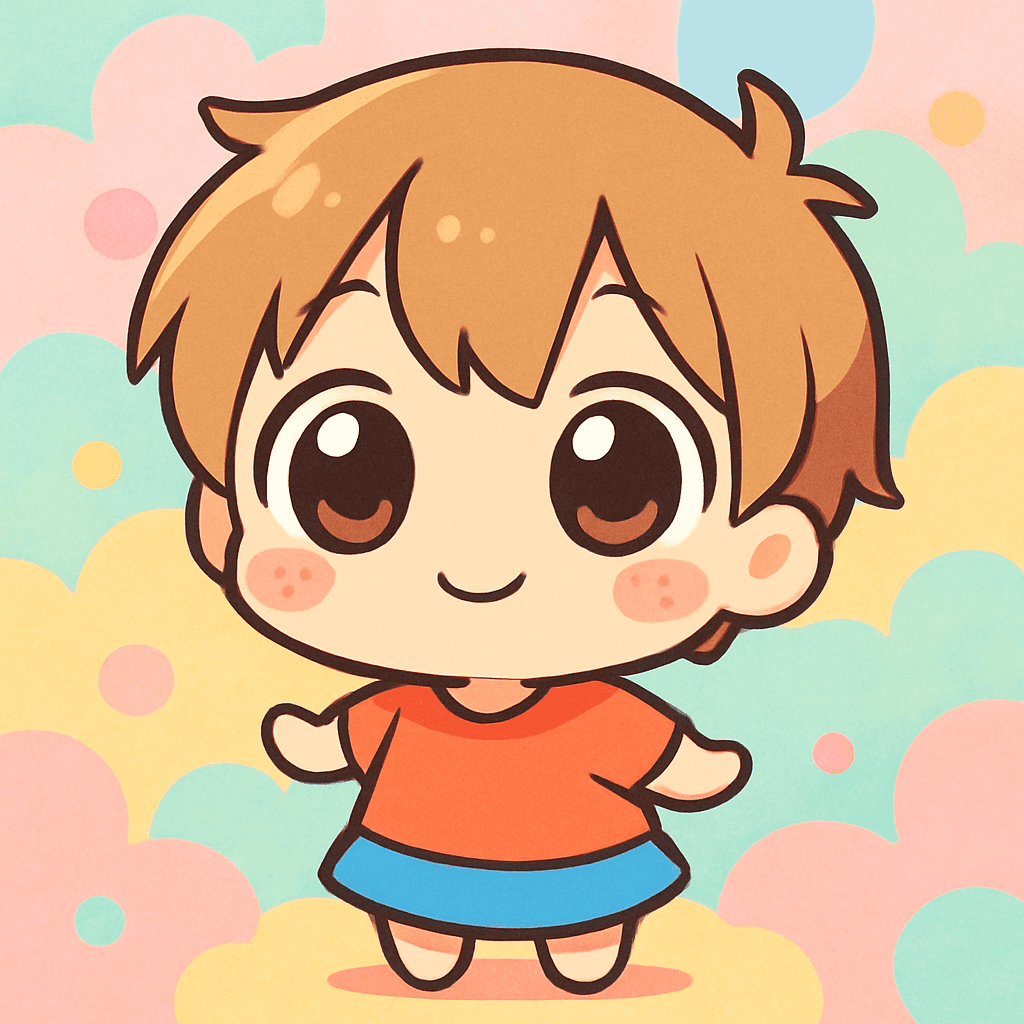
Chibi (literally “short” or “small” in Japanese) is the ultra-cute, super-deformed art style that exaggerates heads to roughly twice the size of the body and replaces normal facial proportions with enormous, sparkling eyes and a tiny button nose. The look originated in Japanese manga and doujinshi as a shorthand for expressing overwhelmingly cute emotions — and it never stopped spreading. Today you find chibi characters on LINE stickers, Discord emotes, Twitch overlays, K-pop fan art, birthday cards, and millions of social media profiles worldwide.
The style is instantly joyful. Something about the 2:1 head-to-body ratio short-circuits your brain's nurturing instincts — the same way you react to a baby animal — and makes you want to screenshot and share immediately. That emotional trigger is why chibi avatars consistently outperform other anime styles for engagement on platforms like TikTok and Instagram.
MiniFigureAI's chibi style was trained to nail the key markers: the oversized round head, the candy-bright color palette, the giant reflective eyes with multi-point sparkle highlights, and the simplified body proportions that feel deliberate rather than distorted. Below is the complete guide to turning your photo into a chibi version of yourself in under 60 seconds.
What You'll Need
- A photo of yourself — a selfie or clear portrait works best
- A smiling or expressive face for the most kawaii result
- A browser on any device — no app download required
- About 60 seconds
Step-by-Step Guide
- 1
Go to minifigureai.com
Open minifigureai.com in any browser — works on mobile, tablet, or desktop. No account or credit card required to generate your first chibi avatar. - 2
Upload your photo
Tap or click the upload area and select your photo. A front-facing portrait with a visible smile gives the AI the most to work with — chibi style relies heavily on facial expression, and the AI uses your natural expression as the starting point for the exaggerated kawaii result. - 3
Select "Chibi" from the style chips
Scroll through the style selector and choose Chibi. The style chip shows a sample chibi output so you know exactly what to expect. You can also browse adjacent styles like Shonen Anime and Ghibli in the same gallery to compare the different anime aesthetics side by side. - 4
Wait about 30 seconds
The AI processes your photo and applies the chibi transformation — enlarging the head, simplifying the body, painting in those characteristic giant eyes with sparkle highlights, and saturating the color palette to kawaii-bright levels. Generation typically completes in 20–40 seconds. - 5
Download, share, or try another style
Once your chibi avatar is ready, download the high-resolution PNG for use as a profile picture, sticker, or printed gift. Hit Try Another Style to generate a Shonen Anime version from the same photo — comparing chibi's kawaii proportions against shonen's action-hero energy is a popular way to find your personal style.
Tips for the Best Results
- Smiling and expressive faces work best for chibi. Chibi art is built around exaggerated emotion — joy, surprise, delight. A natural smile gives the AI clear emotional cues to amplify into the oversized kawaii expression chibi is known for. Neutral or serious expressions can feel slightly flat in the final result.
- Bright and colorful outfits enhance the look. Chibi's candy-bright palette pops most when the source photo already has some color to work with. Wearing a red hoodie, a patterned dress, or a bright jacket gives the AI more to exaggerate into the vivid chibi color scheme. Solid dark or muted outfits still work, but vibrant clothing tends to produce the most eye-catching results.
- Accessories — bows, hats, glasses — are adorable in chibi. The chibi style exaggerates distinctive features, and accessories are part of that. Glasses become oversized and cute, hats look proportionally massive against the already-big head, and hair accessories like bows become focal points of the whole composition. If you have a signature accessory, wear it in your photo.
- Solo photos work best for the cute proportions. Chibi's extreme head-to-body ratio is a deliberate artistic choice that works best when the AI can focus on a single subject. Group photos are possible, but the proportional distortion can look unexpected when applied across multiple people at once. For the clearest chibi transformation, use a solo portrait.
- Compare with Shonen Anime for a different take on the same photo. Chibi and Shonen Anime are both anime-derived styles, but they sit at opposite ends of the energy spectrum — chibi is soft and kawaii, shonen is bold and action-driven. Generating both from the same photo is a great way to see which anime aesthetic feels more like you, and the side-by-side comparison consistently performs well on social media.
Chibi style — kawaii proportions, candy colors

Shonen Anime style — bold lines, action energy
What Makes Chibi Style Special?
Chibi isn't just “anime but smaller.” It's a deliberate set of proportional and color decisions that combine to create an overwhelming cuteness response — sometimes called the Kindchenschema effect, the same instinct triggered by baby animals. Here are the defining characteristics:
- 2:1 head-to-body ratio. A standard anime character has a head roughly one-eighth the body's height. In chibi, the head is often as large as the rest of the body combined. This extreme proportion is the single most recognizable chibi marker and the reason the style reads as “cute” before you consciously register any other detail.
- Giant eyes with sparkle highlights. Chibi eyes occupy a disproportionate amount of the face — typically one-third of the total face area. They're rendered with multiple circular highlight points, giving them a wet, luminous quality that suggests constant wonder and delight. The eyes are always the most detailed part of a chibi face.
- Candy-bright color palette. Where Ghibli uses warm, desaturated watercolors, chibi leans into maximum saturation — pinks, sky blues, lemon yellows, mint greens. Colors are flat and clean rather than textured, giving chibi a graphic, sticker-ready quality that prints and displays crisply at any size.
- Sparkle and shine highlights. Chibi art layers in decorative sparkle elements — star-shaped or cross-shaped highlights on hair, eyes, and accessories. These aren't realistic light reflections; they're stylistic signals that say “this world is magical and joyful.”
- Simplified features. Noses are typically a single small dot or absent entirely. Mouths are small simple curves. Hands are rounded mitten shapes. This simplification isn't laziness — it's intentional abstraction that keeps the emotional focus on the giant expressive eyes.
Perfect Uses for Chibi Avatars
Chibi's compact, graphic quality makes it unusually versatile. Unlike photorealistic styles that work best large, chibi reads clearly at thumbnail size — which is exactly what most digital use cases need:
- Profile pictures. Chibi avatars are among the most popular profile picture styles across Discord, Twitter/X, TikTok, and gaming platforms. The exaggerated proportions are instantly recognizable at 40px thumbnail size, and the cuteness factor makes people want to click.
- LINE and WhatsApp stickers. Chibi was practically invented for messaging sticker packs. The style's bold outlines and flat colors compress cleanly at sticker dimensions, and the emotional expressiveness of chibi faces makes them ideal for conveying reactions in chat.
- Couple and matching avatars. Chibi matching avatars — where two people generate their chibi versions and use them as paired profile pictures — are a hugely popular trend in East Asian social media culture. The style's kawaii quality gives even simple couple portraits a warm, celebratory feeling.
- Birthday cards and personalized gifts. A chibi version of the birthday person is a genuinely delightful card element — instantly recognizable as them, visually distinctive, and warm without being cheesy. Printed on cards, mugs, or phone cases, chibi avatars make gifts feel personal rather than generic.
- Social media and content creation. Chibi avatars make great channel art, stream overlays, YouTube thumbnails, and Instagram highlights covers. The graphic quality scales from tiny icons to large banners without losing visual clarity.
Other Anime Styles to Try
Chibi is the kawaii end of the anime spectrum. If you want to explore the full range, MiniFigureAI offers several other anime-inspired styles, each with a distinct visual character:
- Studio Ghibli — soft watercolor textures, warm Miyazaki palette, expressive hand-painted quality. The most artistically prestigious anime style and the one most likely to get framed and hung on a wall. Emotionally warm in a different way than chibi — thoughtful rather than cute.
- Shonen Anime — bold outlines, dynamic energy, vibrant colors inspired by Dragon Ball, Naruto, and My Hero Academia. Where chibi is soft and round, shonen is sharp and action-driven. The same face that looks adorable in chibi looks like a battle-ready hero in shonen.
- Cyberpunk Anime — neon-lit, rain-slicked, dystopian. Inspired by Akira and Ghost in the Shell. The aesthetic counterpoint to chibi's warmth: dark backgrounds, electric purples and blues, a mood of technological alienation rendered in beautiful high contrast.
Browse all available styles on the MiniFigureAI home page — the style gallery shows sample outputs for every option so you can compare before uploading.
Frequently Asked Questions
Is the chibi avatar generator free?
Yes — your first avatar on MiniFigureAI is completely free. No credit card required, no account needed. The chibi style is available on the free tier alongside all other styles. Additional generations are available with a paid plan.
What exactly is chibi style?
Chibi is a Japanese art style characterized by a dramatically oversized head (roughly equal to or larger than the body), giant sparkling eyes, simplified facial features, and a candy-bright color palette. The word chibi means "small" or "short" in Japanese. The style originated in manga and doujinshi as a way to express exaggerated cute emotions and is now ubiquitous in sticker packs, fan art, and social media avatars worldwide.
Does the chibi generator work with pets?
MiniFigureAI's chibi style is optimized for human portraits — the AI uses facial feature detection to apply the proportional transformations that make chibi look right. Pet photos may produce unexpected results as the feature detection is tuned for human faces. For best results, use a clear front-facing portrait of a person.
Can I print my chibi avatar?
Absolutely. MiniFigureAI generates high-resolution PNG files that print cleanly on cards, stickers, mugs, phone cases, and canvas prints. Chibi art is particularly well-suited for printing because its flat colors and bold outlines scale crisply to any size without the blurriness that affects photorealistic styles.
Which anime style is the cutest?
Chibi is widely considered the cutest anime style — the exaggerated 2:1 head-to-body ratio and giant sparkling eyes trigger an instinctive cuteness response that other styles don't match. Ghibli comes close with its warm, emotionally resonant character designs, but chibi wins on pure kawaii impact. If you want to compare, generate both from the same photo — the difference is dramatic.
Make Your Chibi Self
Upload your photo and generate your kawaii chibi avatar in under 60 seconds. Oversized head, giant sparkly eyes, candy-bright colors — free to try, no account required.
Make Your Chibi SelfNo credit card required · First avatar is free
MiniFigureAI is an independent product and is not affiliated with, endorsed by, or sponsored by LEGO Group, Disney, Pixar, Lucasfilm, Nintendo, Mojang Studios, Marvel, DC Comics, Studio Ghibli, or any other brand mentioned on this page. All trademarks belong to their respective owners. Avatars are AI-generated artwork inspired by popular art styles.