
Seasonal Guide
Create a Diwali Avatar with AI — Share the Festive Spirit
March 2026 · 5 min read
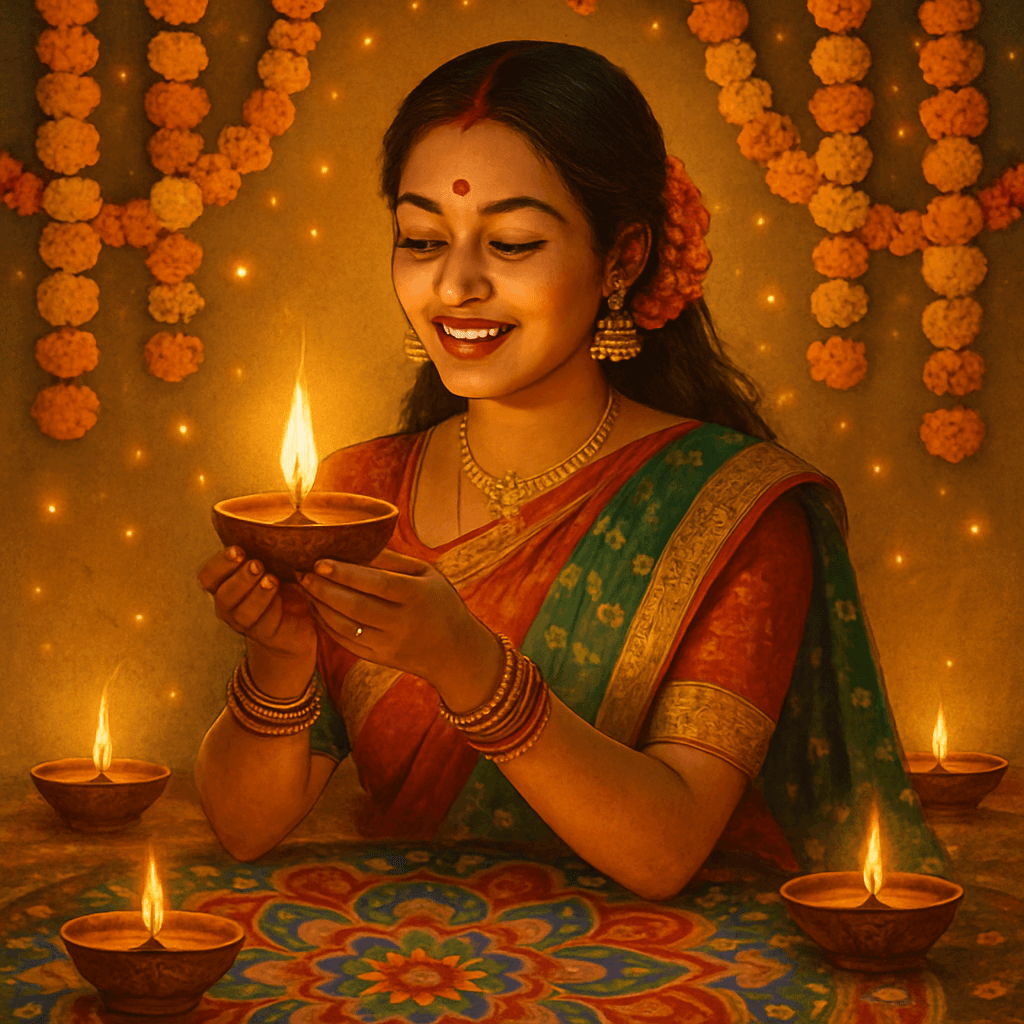
Diwali is the festival of lights — a celebration of joy, family, and new beginnings. Now you can create a festive Diwali avatar featuring traditional Indian attire, diyas, rangoli patterns, and marigold garlands. Share the spirit with your community in 60 seconds, no design skills required.
Step-by-Step Guide
- 1
Choose a clear photo of yourself or a loved one
Pick a well-lit, front-facing photo where the face is clearly visible. A casual family snapshot or a recent portrait both work well. The AI captures hair color, skin tone, and facial features — the clearer the photo, the more accurate the likeness. - 2
Go to MiniFigureAI and upload the photo
Head to minifigureai.com and upload your photo. The first avatar is completely free — no account or credit card required. If you are creating avatars for the whole family, a credit pack starts at $2.99. - 3
Select the Diwali style
Choose the Diwali style from the style picker. The AI will transform your photo into a festive scene complete with traditional Indian attire, glowing diyas, vibrant rangoli patterns, and marigold garlands. The generation takes about 30 seconds. - 4
Preview and download the high-resolution result
Review your Diwali avatar. Download the high-resolution PNG — suitable for digital sharing, printing, or using as a profile picture. The golden lighting and festive details make every result feel warm and celebratory. - 5
Share with family and friends
Set it as your WhatsApp profile picture, post it to Instagram Stories, or send it as a digital Diwali greeting. You can also print and frame it for a keepsake gift that relatives abroad will treasure.
Tips for the Best Results
- Traditional and festive clothing enhances the look. If you have a photo in a saree, kurta, lehenga, or any traditional attire, use it. The AI incorporates your existing clothing into the final avatar, making the festive transformation feel even more authentic.
- The AI adds diyas and rangoli automatically. You do not need any special props or background. MiniFigureAI places glowing diyas, intricate rangoli patterns, and golden lighting around your figure as part of the Diwali style — no setup required on your end.
- Family group photos create beautiful Diwali portraits. Upload a family photo and generate everyone together as a Diwali avatar. Print it as a framed portrait or send it as a group digital greeting — a completely personal way to celebrate together.
- Share on WhatsApp and Instagram for the festive season. Diwali avatars are made for social sharing. Set yours as your WhatsApp display picture during the festive week, or post it to Instagram Stories with a greeting. The vibrant colors and golden glow stand out in any feed.
- Works with any photo, but festive attire gives the best results. While the AI can transform any clear photo into a Diwali avatar, using a photo where you are already in bright, celebratory clothing produces the most vivid and authentic-looking result.
Diwali style — traditional attire, diyas, and rangoli

Lunar New Year style — another vibrant cultural celebration
The Diwali Avatar Style
The Diwali style is designed to capture the full richness of the festival of lights. Every avatar generated in this style includes:
- Traditional attire. Your figure is rendered in elegant Indian festive clothing — sarees, sherwanis, lehengas, and kurtas — adorned with intricate embroidery and jewel tones.
- Glowing diyas. Rows of earthen oil lamps surround the scene, casting a warm golden light that is unmistakably Diwali.
- Rangoli patterns. Colorful geometric rangoli designs frame the composition, adding the vibrant, hand-crafted artistry that defines the festival.
- Marigold garlands. Strings of marigolds — the sacred flower of Indian celebrations — wind through the scene, adding depth and authenticity.
- Golden lighting. The entire image is bathed in the warm, luminous glow that gives Diwali its name: the festival of lights.
- Firework sky. A burst of colorful fireworks lights up the background, completing the festive atmosphere of the most celebrated night of the year.
Diwali Avatar Uses
A Diwali avatar is more versatile than it might seem. Here are the most popular ways people are using them this festive season:
- 1WhatsApp profile picture. Change your display photo for the Diwali week. Friends and family will immediately recognize the festive gesture — it sparks conversations and spreads the celebratory mood before you even send a single message.
- 2Instagram Stories. Post your Diwali avatar as an Instagram Story with a “Shubh Deepawali” greeting. The vibrant colors and golden glow make it stand out against the usual feed. Pair it with a reel of your celebrations for a complete festive story.
- 3Family group portrait. Generate a Diwali avatar for every member of the family and arrange them side by side in Canva. Print it as a framed group portrait to hang at home — a keepsake that commemorates the celebration year after year.
- 4Digital Diwali greeting card. Drop your avatar into a Canva greeting card template, add a message, and send it as a PDF or image. Far more personal than a generic e-card — it shows you put thought into the greeting.
- 5Gift for relatives abroad. For family members who cannot be home for Diwali, a personalized avatar sent digitally is a heartfelt way to include them in the celebration. It takes 60 seconds to create and lands in their inbox anywhere in the world.
Other Cultural & Holiday Styles
Diwali is one of many cultural and seasonal styles available on MiniFigureAI. If you want to celebrate other occasions with the same festive energy, explore these guides:
- Lunar New Year Avatar — red lanterns, dragon motifs, and golden prosperity themes for the Spring Festival
- Christmas Avatar Gift — festive trees, twinkling lights, and Santa hats for the holiday season
- New Year's Avatar — fireworks, confetti, and midnight celebrations to ring in the new year
Frequently Asked Questions
What is a Diwali avatar creator?
A Diwali avatar creator is an AI tool that transforms your photo into a festive, illustrated avatar featuring traditional Indian attire, glowing diyas, rangoli patterns, marigold garlands, and a firework sky. MiniFigureAI generates your Diwali avatar in about 30 seconds — no design skills required.
Do I need to be wearing traditional clothing in my photo?
No — the AI will render you in traditional attire regardless of what you are wearing in the original photo. That said, if you already have a photo in festive clothing like a saree, kurta, or lehenga, the result tends to be even more vivid and authentic because the AI can blend real and generated details seamlessly.
Can I create a Diwali avatar for my whole family?
Yes. Each person needs their own photo and uses one credit. Upload each family member separately, generate their individual Diwali avatar, then arrange them together in a tool like Canva for a group portrait. A credit pack of 10 starts at $6.99 — enough to create a complete family Diwali portrait for under $10.
Can I send my Diwali avatar as a gift to relatives abroad?
Absolutely. Your Diwali avatar downloads as a high-resolution PNG that you can send via WhatsApp, email, or any messaging platform in seconds. For relatives who cannot be home for Diwali, a personalized avatar sent digitally is a thoughtful, instant way to include them in the celebration from anywhere in the world.
Is the Diwali avatar free to create?
Your first avatar is completely free — no account or credit card required. After that, additional credits start at $2.99. Credits never expire, so you can create your Diwali avatar now and save remaining credits for other occasions like Lunar New Year, Christmas, or any other style MiniFigureAI offers.
Create Your Diwali Avatar
Upload your photo and generate a stunning Diwali avatar in under 60 seconds. First avatar is free — no account required.
Create Your Diwali AvatarNo credit card required · First avatar is free
MiniFigureAI is an independent product and is not affiliated with, endorsed by, or sponsored by LEGO Group, Disney, Pixar, Lucasfilm, Nintendo, Mojang Studios, Marvel, DC Comics, Studio Ghibli, or any other brand mentioned on this page. All trademarks belong to their respective owners. Avatars are AI-generated artwork inspired by popular art styles.