
Animation & Art Styles
Turn Yourself into a Pixar Character with AI — Free Tool
March 2026 · 5 min read
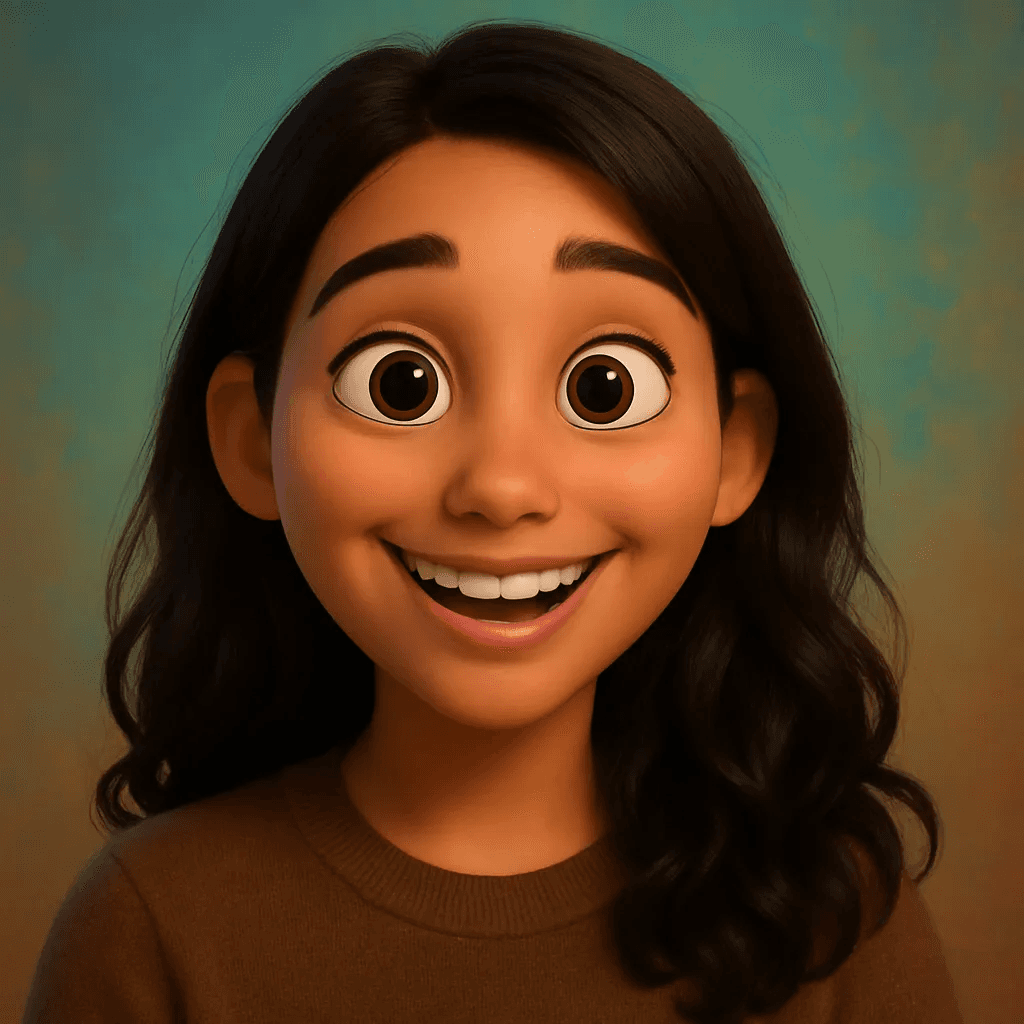
Pixar's visual language is one of the most recognizable in cinema. From the joyful chaos of Inside Out to the candlelit warmth of Coco and the monster-fur textures of Monsters, Inc., every Pixar film is a masterclass in character design — expressive eyes that carry emotional arcs, exaggerated proportions that amplify personality, and a cinematic lighting approach that makes 3D animation feel more real than real life.
What makes the Pixar aesthetic technically distinct is subsurface scattering — the way light passes through skin and bounces beneath the surface, giving characters that warm, luminous quality that separates Pixar renders from generic CGI. Combined with carefully weighted facial proportions and depth-of-field cinematography, it's a look that took Pixar's engineers and artists decades to perfect.
MiniFigureAI's Pixar style brings that same visual richness to your own photo. Upload a portrait, select Pixar, and in about 60 seconds you'll see yourself rendered as a character who could walk onto the screen of the next Pixar feature. No software to install, no account required — just your photo and the result.
What You'll Need
- A photo of yourself — a selfie or portrait works best
- Natural or soft indoor lighting for best skin tone rendering
- A browser — no app download needed
- About 60 seconds
Step-by-Step Guide
- 1
Go to minifigureai.com
Open minifigureai.com in any browser — works on mobile, tablet, or desktop. No account or sign-up required to try your first avatar. - 2
Upload your photo
Tap or click the upload area and select your portrait. A clear, front-facing photo gives the AI the most to work with — the Pixar style particularly benefits from seeing your facial structure clearly, since it uses those proportions to generate the characteristic Pixar-style exaggeration. - 3
Select "Pixar" from the style chips
Scroll through the style selector and choose Pixar. The style chip shows a sample of the 3D cinematic aesthetic. You can also browse Disney, Ghibli, and Shonen Anime — generating all three from the same photo for a style comparison is a popular approach. - 4
Wait about 30 seconds
The AI processes your photo and applies the Pixar rendering — building the 3D character geometry, applying the subsurface scattering skin shader, and setting the cinematic lighting that defines the Pixar look. Generation typically completes in 20–40 seconds. - 5
Download, share, or compare styles
Once your avatar is ready, download the high-resolution PNG for printing, posting, or using as a profile picture. Hit Try Another Style to generate a Disney version side by side — the 3D-vs-2D comparison between Pixar and Disney is one of the most shared formats on the platform.
Tips for the Best Results
- Pixar captures personality in expressions. The Pixar style is built to amplify character — if your photo has a genuine smile, raised eyebrow, or expressive look, the AI will lean into that. Candid or slightly expressive photos produce more interesting results than flat, neutral portraits.
- Bright, saturated clothing works well. Pixar's color direction is bold and purposeful — characters wear colors that reflect their personality. A photo with a bright red jacket or vivid blue shirt gives the AI richer material for the character design than a plain grey or black outfit.
- Works beautifully with kids and families. Pixar is the quintessential family animation studio. Photos of children, family groups, or parent-child moments produce some of the most emotionally resonant results — the Pixar style has a warmth that makes group portraits feel like movie stills.
- Natural lighting brings out the subsurface scattering effect. Pixar's signature skin rendering relies on light interacting with the surface. A photo taken near a window or in soft outdoor light gives the AI more luminance data to work with, which translates into that warm, glowing skin quality the style is known for.
- Compare with Disney for a different feel. Pixar and Disney share character warmth but differ fundamentally in approach: Pixar is fully rendered 3D with cinematic realism; Disney is expressive 2D line art with stylized proportions. Generating both from the same photo and comparing is a quick way to decide which aesthetic fits your intended use.
Pixar style — 3D cinematic, subsurface scattering
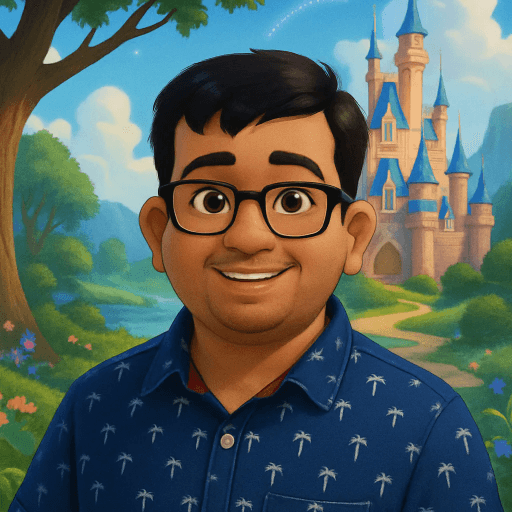
Disney style — 2D expressive line art
The Pixar Art Style
Pixar's visual identity was forged over 40 years of technical and artistic innovation. What looks effortless on screen is the product of a rendering pipeline that pushed the limits of computing with every film. Here are the four visual elements that define the Pixar look:
- Subsurface scattering. Human skin isn't opaque — light penetrates slightly and bounces back from beneath the surface, creating the warm, luminous quality that makes skin look alive rather than plastic. Pixar pioneered subsurface scattering in CG characters with The Incredibles, and it's been a hallmark of their rendering ever since. It's the difference between a Pixar character and generic CGI.
- Exaggerated proportions. Pixar characters don't follow anatomically accurate proportions — heads are slightly larger, eyes are wider and more expressive, and body shapes are stylized to communicate personality at a glance. This amplification is deliberate: it makes emotions readable from the back row of a cinema.
- Cinematic lighting. Every Pixar scene is lit like a feature film — with key lights, fill lights, rim lights, and color temperature shifts that create depth and mood. Characters have shadows that interact with their environment, and lighting changes dynamically to reflect the emotional tone of a scene. The result is 3D animation that feels as visually rich as live-action cinematography.
- Rich textures. From the fabric of a superhero suit in The Incredibles to the hair simulation in Brave and the surface detail of toys in Toy Story 4, Pixar's texture work is obsessive. Every surface has micro-detail — wood grain, fabric weave, skin pores — that catches light differently and makes the rendered world feel physically real.
Pixar vs Disney — Which Should You Choose?
Both Pixar and Disney are beloved animation styles available on MiniFigureAI, and both produce striking avatars — but the aesthetic difference is significant. Here's how to decide which fits your photo and intended use:
- 3D vs 2D. Pixar is fully rendered 3D — characters have volume, depth, and lighting that mimics a physical world. Disney is expressive 2D line art with flat color fills and bold outlines, closer to classic hand-drawn animation. If you want a character that looks sculpted and cinematic, choose Pixar. If you want a clean, graphic illustration, choose Disney.
- Character proportions. Both styles exaggerate, but differently. Pixar exaggerates toward cinematic realism — slightly enlarged heads and eyes, but otherwise plausible body shapes. Disney exaggerates toward graphic stylization — more pronounced jawlines, elongated limbs, and character archetypes that read as heroic or whimsical depending on the source photo.
- Realism level. Pixar aims for emotional realism — characters look like stylized versions of real people, and their skin, hair, and clothing behave physically. Disney is more impressionistic — the line art captures the essence of a person without trying to simulate physical materials. Pixar results often feel more like portraits; Disney results feel more like illustrations.
The fastest way to decide is to generate both. Upload your photo, generate the Pixar version, then switch to Disney — the side-by-side comparison usually makes the choice obvious. Many people find they prefer Pixar for photos of children and families, and Disney for single-subject portraits where the graphic quality of 2D art reads well.
Frequently Asked Questions
Is the Pixar style free?
Your first avatar on MiniFigureAI is completely free — no credit card required, no account needed. The Pixar style is available on the free tier alongside all other styles. Additional generations are available with a paid plan.
How accurate is the likeness in Pixar style?
MiniFigureAI preserves your distinctive features — facial structure, hair color, skin tone, and any visible accessories like glasses — while applying the Pixar stylization on top. The result looks like a character designed to represent you, not a generic Pixar character. A clear, well-lit front-facing photo gives the AI the most to work with.
What is the difference between Pixar and Disney style?
Pixar is fully rendered 3D with cinematic lighting and subsurface scattering skin shaders — characters have volume, depth, and physical texture. Disney is expressive 2D line art with a graphic, illustrative aesthetic. Pixar results tend to feel more like cinematic portraits; Disney results feel more like stylized illustrations. Both are available on MiniFigureAI and many people generate both for comparison.
Does it work with groups and family photos?
Yes — upload a photo with multiple people and the AI renders all subjects in Pixar style. Family photos and parent-child portraits work especially well because Pixar's warmth and expressiveness translates naturally to group dynamics. The result looks like a still from a Pixar family film.
What resolution is the output?
Generated avatars are high-resolution PNG files suitable for printing, social media profile pictures, and digital use. The exact output dimensions depend on your input photo — uploading a higher-resolution source image gives the AI more detail to work with and typically produces a sharper result.
See Yourself in Pixar Style
Upload your photo and see yourself rendered in Pixar's iconic 3D style — cinematic lighting, expressive eyes, subsurface scattering skin. Free to try, no account required.
See Yourself in Pixar StyleNo credit card required · First avatar is free
MiniFigureAI is an independent product and is not affiliated with, endorsed by, or sponsored by LEGO Group, Disney, Pixar, Lucasfilm, Nintendo, Mojang Studios, Marvel, DC Comics, Studio Ghibli, or any other brand mentioned on this page. All trademarks belong to their respective owners. Avatars are AI-generated artwork inspired by popular art styles.