
Seasonal Guide
Summer's Here. How Does Your Avatar Look in the Sun?
May 2026 · 5 min read
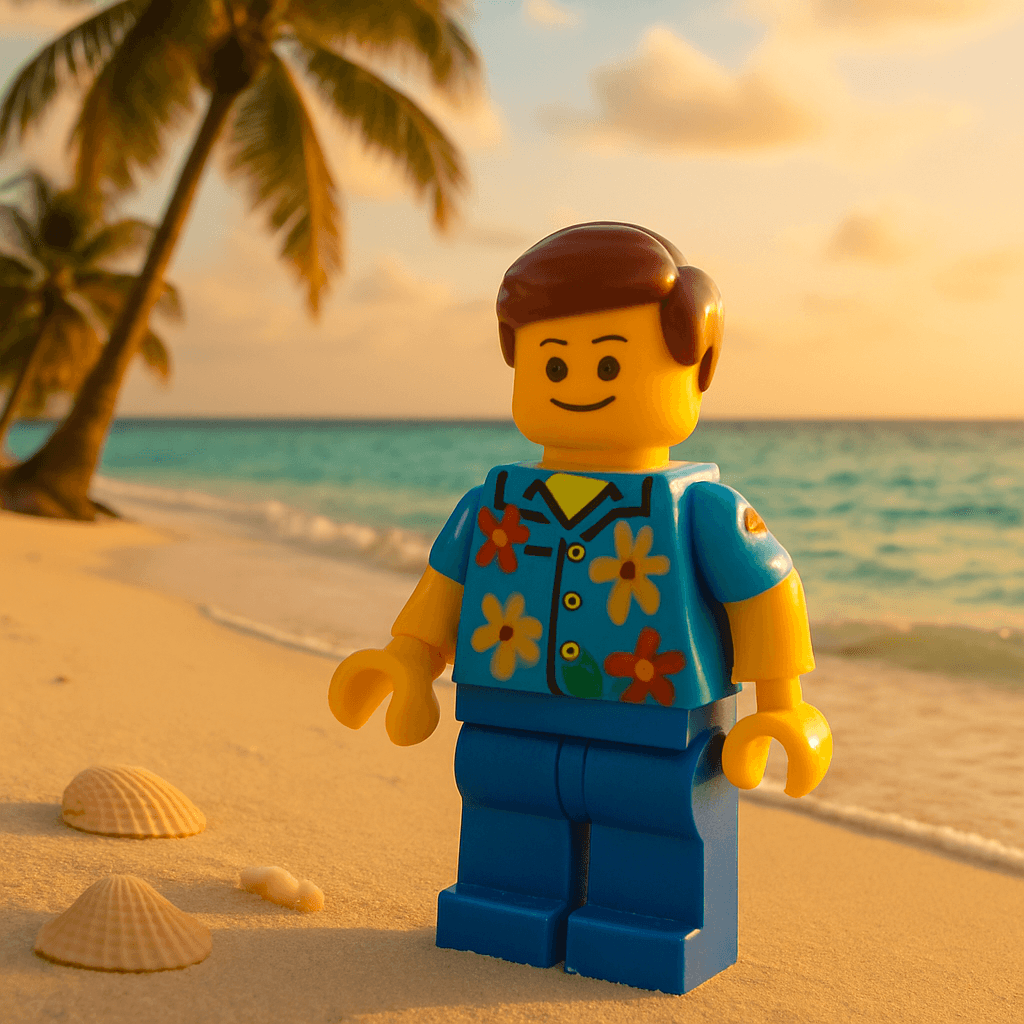
Summer is here, and your avatar should look the part. The Beach style on MiniFigureAI turns your photo into a warm, golden-hour coastal portrait in about 30 seconds — free to try, no account required. Whether you want a summer profile picture update, a personalized gift for a friend, or a printed keepsake from the season, this guide walks you through exactly how to make it happen.
Step-by-Step Guide
- 1
Upload your photo
Head to minifigureai.com and upload a clear, well-lit photo of yourself — or whoever you are making the avatar for. A front-facing photo with the face clearly visible gives the most accurate likeness. A recent phone photo taken outdoors in good light works perfectly. - 2
Pick the Beach style
Select the Beach style from the style picker. The Beach style renders your likeness in a warm, sun-soaked coastal setting — think golden-hour light, ocean backdrop, relaxed summer energy. It captures the feeling of the first real beach day of the year, not just a generic tropical filter. - 3
Generate your avatar
Hit generate and the AI produces your beach avatar in about 30 seconds. The result is a high-resolution portrait with your likeness placed naturally into the beach scene. You can generate the same photo in multiple styles to build a summer set. - 4
Download the high-resolution PNG
Download the finished avatar as a high-resolution PNG. It prints cleanly at standard sizes — 4x6, 5x7, or 8x10 — and works just as well for digital sharing, social posts, or print-on-demand products like phone cases or postcards. - 5
Share it, print it, or give it as a summer gift
Post it to Instagram or TikTok as your summer debut, print and frame it for a beach house wall, or give it to a friend as a personalized summer keepsake. See the presentation ideas below for the most popular ways to use a beach avatar this season.
Tips for the Best Results
- Use a photo taken in natural light. Outdoor photos with soft, even lighting produce the most accurate skin tones and facial details in the Beach style. Avoid harsh direct sunlight that creates deep shadows across the face — open shade or a cloudy day actually works better than noon sun.
- A relaxed, natural expression reads best in the beach setting. The Beach style has a laid-back, golden-hour quality to it. A genuine smile or a neutral, relaxed expression fits the vibe better than a formal portrait pose. Candid shots from past vacations often produce excellent results.
- Generate the whole friend group individually, then combine them. Upload each person separately for the sharpest individual results, then arrange the avatars side by side in Canva to create a group "Summer 2026" poster. Everyone gets their own copy, and the group version goes on the fridge or wall.
- Pair the Beach style with a second style for a two-avatar gift set. Generate the same person in the Beach style and one complementary style — Pixar or Ghibli both pair well with the warm coastal aesthetic. Present them together as a set for a gift that goes beyond a single image.
- Print on a postcard for a summer message that actually gets kept. Upload the avatar to a print service like Shutterfly or Canva Print and order it as a 4x6 postcard. Write a summer message on the back and mail it. A personalized avatar postcard costs under $3 to print and mail and lands in someone's kitchen for the whole season.
Beach style — golden-hour coastal portrait
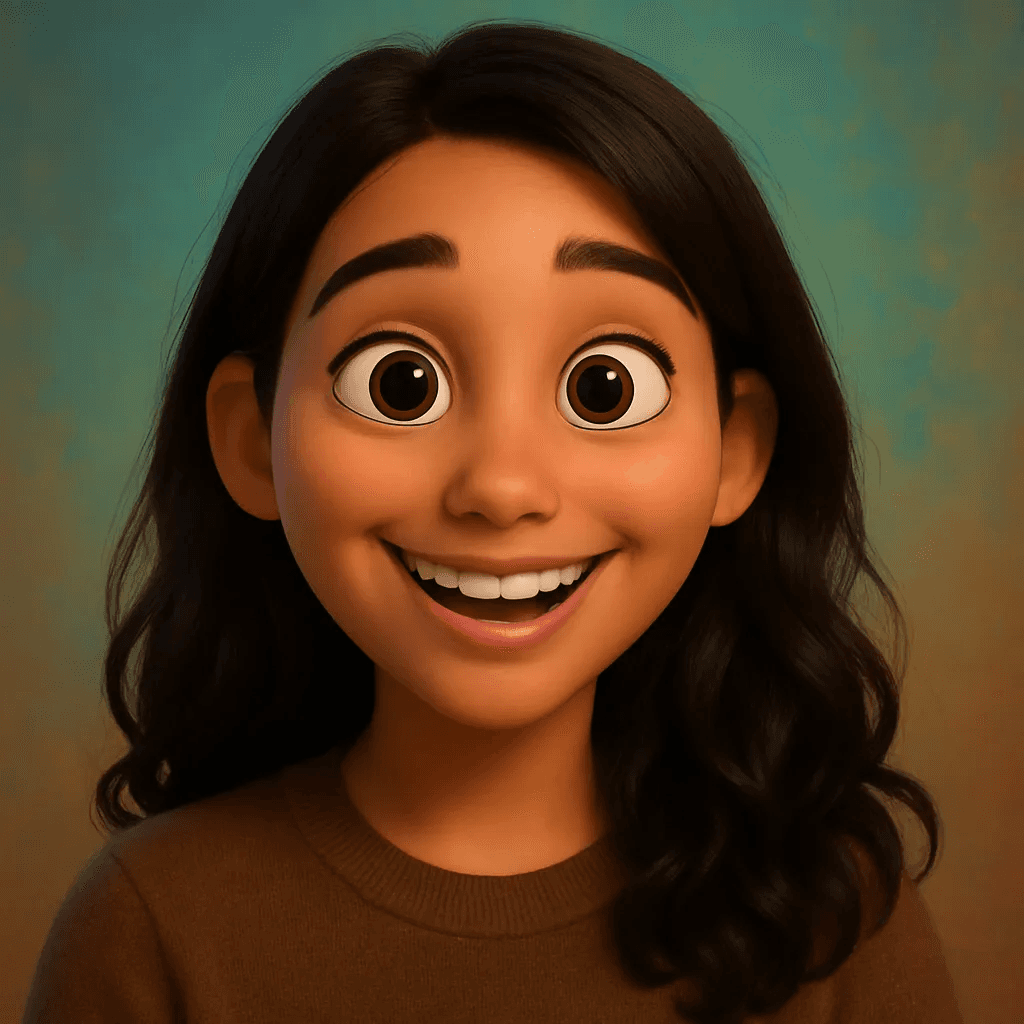
Pixar style — a warm summer pairing
Why Beach Avatars Make Great Summer Gifts
- Personal. A beach avatar is made from someone's actual face — it is not a stock illustration or a generic tropical graphic. That specificity is what makes it a gift rather than just a novelty.
- Timely. Summer has a natural energy around it — people are already thinking about the beach, vacations, and warm-weather memories. A beach avatar lands at exactly the right moment when the mood is already there.
- Affordable. The first avatar is free. Additional credits start at $2.99 — far less than the $30–$80 a custom physical figure costs, with no shipping wait and no minimum order size.
- Shareable. Beach avatars travel immediately to Instagram and TikTok. The combination of a recognizable face and a sun-soaked setting is exactly the kind of image people want to share and repost in June.
- Versatile. The high-resolution PNG works as a profile picture, a printed postcard, a phone case, a framed print for a beach house, or a sticker sheet for a summer water bottle. One avatar, many uses.
4 Ways to Share or Present Your Beach Avatar This Summer
1. Summer profile picture update
Swap your profile picture to your beach avatar for the season on Instagram, TikTok, or WhatsApp. It is one of the most common ways people use their MiniFigureAI avatars — the beach style in particular reads immediately as a summer identity refresh.
2. Printed postcard
Print the avatar on a 4x6 postcard through Canva Print or Shutterfly, write a summer message on the back, and mail it to someone. A personalized postcard from "you at the beach" is the kind of thing that goes on a refrigerator and stays there through autumn. Total cost under $3 including postage.
3. Framed print for a beach house
Print the avatar at 5x7 or 8x10 and frame it for a beach house, vacation rental, or summer cabin wall. A set of avatars of everyone who frequents the house makes a genuinely great seasonal decoration — and the conversation piece it becomes is half the value.
4. Summer sticker sheet
Print the avatar on vinyl sticker sheets through a service like Sticker Mule and cut them into individual stickers. Beach-style stickers go on water bottles, coolers, and beach bags — all the gear that actually comes out in summer.
Other Styles That Pair Well With Summer
The Beach style is the obvious summer choice, but several other styles share its warm, expressive energy. If you want to build a multi-avatar summer set, these pair naturally:
- Pixar — Warm, expressive, and immediately likable. The Pixar style shares the Beach style's golden-toned palette and makes the avatar feel like the lead character in a summer adventure film. A beach avatar and a Pixar avatar side by side make an excellent two-print set.
- Studio Ghibli — For anyone who considers a quiet afternoon by the water the perfect summer day. The painterly, soft Ghibli style captures a dreamy coastal mood that feels genuinely artistic — and is one of the styles most likely to end up framed as wall art.
- Minifigure — The iconic blocky LEGO style works in every season and every setting. A beach Minifigure version of someone makes a fun contrast to the more atmospheric Beach portrait, and the two together as a gift set cover both the sentimental and the playful angles.
Frequently Asked Questions
How much does a beach avatar cost?
Your first avatar is completely free — no account or credit card required. After that, credit packages start at $2.99, and each credit generates one high-resolution avatar in any style. For a summer gift set of two or three avatars, the total cost is well under $10, which is less than a greeting card and a bag of candy.
What kind of photo works best for the Beach style?
A clear, front-facing photo taken in natural light produces the best results. Outdoor photos with soft, even lighting work particularly well — the Beach style builds on warm tones, so a photo taken in similar conditions gives the AI the most accurate base to work from. Avoid photos with heavy filters, deep shadows across the face, or low resolution.
How long does it take to generate a beach avatar?
The avatar generates in about 30 seconds after you upload the photo. There is no queue or waiting period for standard generation. You can have the finished PNG downloaded and ready to share or send to a print service within two minutes of uploading.
Is the image quality good enough to print and frame?
Yes. MiniFigureAI generates high-resolution PNG files that print sharply at standard sizes — 4x6, 5x7, and 8x10 all look excellent from any online photo service. For larger prints at 11x14 or above, use a professional print service that handles upscaling. Most people print the 5x7 size, which costs under $5 to print and frame from services like Shutterfly or Walmart Photo.
Can I make beach avatars for a group of friends?
Yes — and it is one of the most popular uses for the Beach style around summer gatherings. Upload each person separately from a solo photo for the sharpest individual results, then arrange the avatars together in Canva to create a group summer portrait. Everyone gets their own digital copy to share, and the combined version works beautifully as a printed group poster.
See Yourself in the Summer Sun
Upload a photo and generate your personalized beach avatar in under 60 seconds. First avatar is free — no account required.
Create Beach Avatar — FreeNo credit card required · First avatar is free
MiniFigureAI is an independent product and is not affiliated with, endorsed by, or sponsored by LEGO Group, Disney, Pixar, Lucasfilm, Nintendo, Mojang Studios, Marvel, DC Comics, Studio Ghibli, or any other brand mentioned on this page. All trademarks belong to their respective owners. Avatars are AI-generated artwork inspired by popular art styles.