
Seasonal Guide
Turn Yourself into a Halloween Costume with AI — No Costume Needed
March 2026 · 5 min read
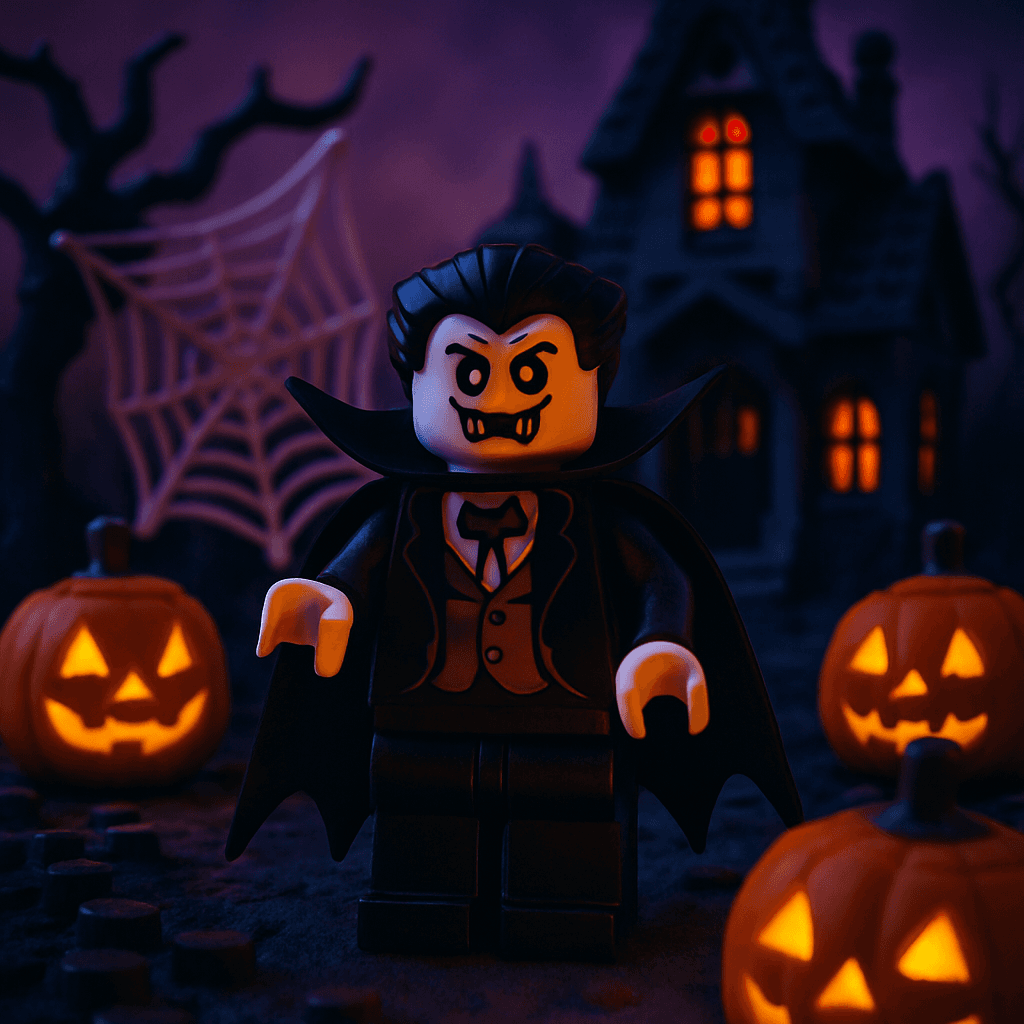
No costume? Don't worry — AI can give you one in 60 seconds. Upload your selfie and MiniFigureAI transforms you into a spooky Halloween character complete with jack-o-lanterns, cobwebs, and haunted house backgrounds. Fun-scary, not terrifying.
The Halloween style delivers a whimsical, festive take on All Hallows' Eve — think carved pumpkins, orange-and-black color palette, and that perfectly spooky-but-fun aesthetic that works for everyone from kids to the office party. For a darker mood, the Horror Villain style goes full cinematic — desaturated tones, ominous lighting, and the kind of atmosphere you'd find on a horror movie poster.
Perfect for profile picture swaps, party invitations, and social media costume reveals. No design skills, no app to download, no actual costume required.
What You'll Need
- A clear photo — a selfie or portrait works best, ideally well-lit and front-facing
- Any web browser on any device (Chrome, Safari, Firefox, Edge)
- About 60 seconds
Step-by-Step Guide
- 1
Visit minifigureai.com
Open your browser and go to minifigureai.com. Your first avatar is completely free — no account required, no credit card needed. Just arrive and start. - 2
Upload your photo
Drag and drop your photo onto the upload area, click to browse your files, or tap the camera icon to use your phone camera directly. JPG, PNG, and WEBP files up to 30MB all work. A clear, front-facing selfie or portrait gives the AI the best material to work with. - 3
Pick "Halloween" from the style selector
In the style picker, choose Halloween. You can browse all 30+ styles before confirming. For a darker take, try Horror Villain right alongside it — same selfie, completely different atmosphere. - 4
AI transforms you in about 30 seconds
Hit generate and the AI gets to work. It analyzes your facial features and expression, then reimagines you in full Halloween style — carved pumpkins, spiderwebs, a haunted house backdrop, and the signature orange-and-black seasonal palette. Most generations complete in 20–40 seconds. - 5
Download and share your Halloween avatar
Your Halloween avatar is ready as a high-resolution PNG. Download it to your device, swap it in as your profile picture, share it to Instagram or TikTok as your “costume reveal,” or send it in your Halloween party invitation. Try Horror Villain next to see a completely different energy from the same photo.
Tips for the Best Results
- Normal selfies work perfectly. You do not need to be wearing a costume in your source photo. The AI adds all the spooky elements — the pumpkins, cobwebs, haunted background, and Halloween palette — around your regular portrait. Any clear selfie you already have on your phone will do.
- Try Horror Villain style for a darker take. The Horror Villain style takes the concept from fun-spooky to cinematic horror. Desaturated tones, dramatic shadows, and a moody horror movie poster atmosphere. Generate both Halloween and Horror Villain from the same photo to see the contrast.
- Group photos create a haunted squad. Upload a photo with friends or family and the AI renders everyone in Halloween style together — an instant haunted crew portrait. Perfect for friend groups, family Halloween cards, or a matching set of spooky profile pictures for a group chat.
- Works great for pet photos too. The Halloween style handles pets beautifully — cats, dogs, and other animals transform into adorably spooky Halloween characters with their own pumpkins and cobwebs. A pet Halloween avatar makes a memorable seasonal profile picture or greeting card image.
- Post it as a "costume reveal" on social media. Even without a physical costume, an AI Halloween avatar gives you something to post. Share it as your digital costume reveal on Instagram, TikTok, or Twitter/X — it starts conversations and plays perfectly into Halloween content trends without requiring you to buy or wear anything.
Halloween style — fun-spooky with pumpkins and cobwebs
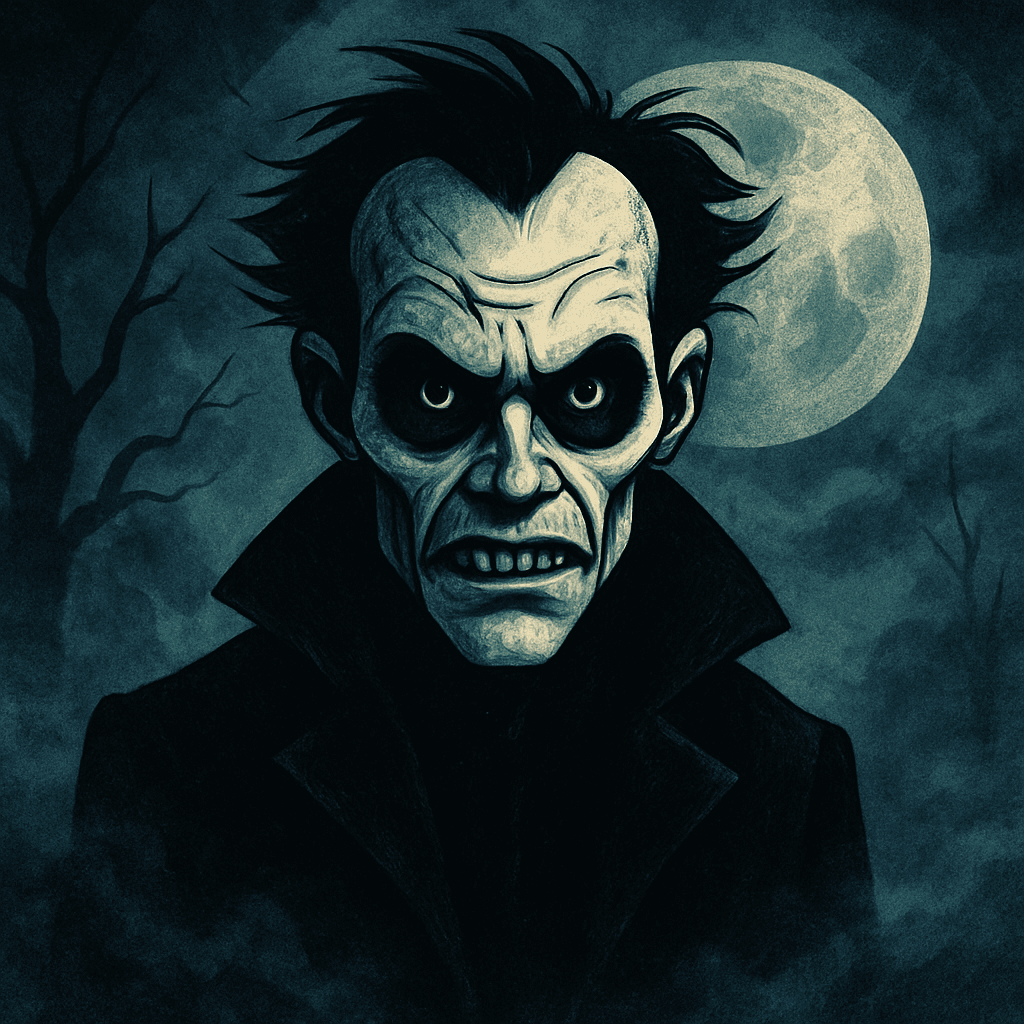
Horror Villain style — darker, moodier cinematic horror
Two Halloween Styles
MiniFigureAI offers two distinct Halloween aesthetics — one fun and festive, one dark and cinematic. Most users generate both from the same photo to find their Halloween persona.
Halloween
- Fun-spooky LEGO minifigure aesthetic
- Jack-o-lanterns and cobweb details
- Orange-and-black seasonal palette
- Haunted house background elements
- Best for: profile pictures, party invites, kids' content
Horror Villain
- Darker, moodier atmosphere
- Desaturated, high-contrast tones
- Cinematic horror movie poster feel
- Ominous lighting and dramatic shadows
- Best for: adult Halloween content, social media costume reveals
Both styles transform the same selfie — the difference is mood and intent. Halloween is warm and festive; Horror Villain is theatrical and intense. Try both to see which Halloween character you are.
Halloween Avatar Use Cases
A Halloween avatar is more versatile than it sounds. Here are the five most popular ways people use their MiniFigureAI Halloween portraits every October.
Profile Picture Swap
The simplest and most popular use. Swap your profile picture on Instagram, Twitter/X, Facebook, or LinkedIn to your Halloween avatar for the season. It takes under a minute and gives your whole online presence a festive Halloween makeover without requiring a physical costume or a professional photoshoot.
Party Invitations
Include your Halloween avatar in digital party invitations. Whether you're sending an Evite, a WhatsApp message, or a group text, a custom spooky avatar of yourself as the host makes the invitation feel more personal and sets the Halloween tone immediately.
Social Media Costume Reveal
Post your Halloween avatar as a digital costume reveal — no physical costume required. The concept resonates well on Instagram and TikTok, where AI-generated Halloween transformations regularly go viral in October. Generate both Halloween and Horror Villain versions and post them as a “which Halloween character are you?” comparison.
Group and Family Halloween Portraits
Upload a group photo and the AI renders everyone in matching Halloween style — an instant family haunted portrait or friend group Halloween card. It works for family holiday cards, group chat profile pictures, and coordinated social media posts where everyone shares their individual version.
No-Costume Costume for Work Events
Not everyone can wear a full costume to a work Halloween party or video call. An AI Halloween avatar gives you a way to participate in the seasonal fun on company Slack, Teams, or Zoom without crossing any workplace dress code lines. Set it as your profile picture for the week and take it down on November 1st.
Spooky Season Content Ideas
Halloween content performs exceptionally well on social media in October. Here are three content formats that work particularly well with AI Halloween avatars.
TikTok Transformation Video
Record a short video showing your original selfie alongside the AI-generated Halloween avatar — before and after. Pair it with a trending Halloween sound and the transformation format that performs well every October. The Horror Villain version tends to generate the strongest reactions, especially when the contrast with the original photo is dramatic.
Instagram Carousel: Style Comparison
Create an Instagram carousel that shows the same photo transformed into both the Halloween and Horror Villain styles side by side, with a third slide showing the original. Caption it as a Halloween costume quiz — “which one are you?” Carousel posts with a question prompt consistently outperform single-image posts for saves and shares.
WhatsApp Group Share
Generate Halloween avatars for your whole friend group and share them in a WhatsApp group chat as a Halloween surprise. Each person in the group gets their own spooky character. It makes for a natural group activity — everyone generates their own version and shares it back to the group, creating a spontaneous haunted ensemble.
Frequently Asked Questions
Is the Halloween avatar generator free?
Yes — your very first avatar is completely free with no account or credit card required. When you sign up for a free account, you also receive 3 additional credits to use on any style, including Halloween and Horror Villain. After that, credit packs start at $2.99.
How scary is the Halloween style?
The Halloween style is fun-spooky, not terrifying. Think carved pumpkins, orange-and-black color palette, cobwebs, and haunted house elements — festive and seasonal, appropriate for all ages. If you want something darker, the Horror Villain style delivers a more cinematic, intense horror movie atmosphere.
Does it work with photos of kids?
Yes. The Halloween style works well with photos of children and produces age-appropriate results — a cute, whimsical spooky character rather than anything frightening. Many parents use it to create Halloween profile pictures or party invitations featuring their kids.
Do I need to be wearing a costume in my photo?
No — that is the whole point. The AI adds all the Halloween elements (pumpkins, cobwebs, haunted backdrop, spooky color palette) to whatever photo you upload. A regular selfie in everyday clothes works perfectly. No costume required in the source photo.
Can I choose specific Halloween characters like a witch or vampire?
MiniFigureAI applies its Halloween style broadly rather than targeting specific named characters. The result is a spooky, festive Halloween character portrait rather than a specific witch, vampire, or zombie. For a specific character aesthetic, try generating with both the Halloween and Horror Villain styles and see which better matches your vision.
Get Your Halloween Avatar
Upload your photo and see yourself transformed into a spooky Halloween character in under 60 seconds. Jack-o-lanterns, cobwebs, haunted house vibes — no costume required. Free on the first try.
Get Your Halloween AvatarNo credit card required · First avatar is free
MiniFigureAI is an independent product and is not affiliated with, endorsed by, or sponsored by LEGO Group, Disney, Pixar, Lucasfilm, Nintendo, Mojang Studios, Marvel, DC Comics, Studio Ghibli, or any other brand mentioned on this page. All trademarks belong to their respective owners. Avatars are AI-generated artwork inspired by popular art styles.